


Apple’s MacBook Neo: A New Contender for Creators
No, Apple’s brand-new entry-level MacBook Neo doesn’t feature the latest and greatest Apple Silicon, the maximum RAM, or the most impressive display. It might struggle to run software like Final Cut Pro or Logic Pro X without a few hiccups. However, with a focus on everyday tasks, a capable A18 Pro chip under the hood, and the same build of macOS 26 as the rest of the Mac lineup, there’s a compelling case to be made that it could serve as a creator’s dream.
Design That Captivates
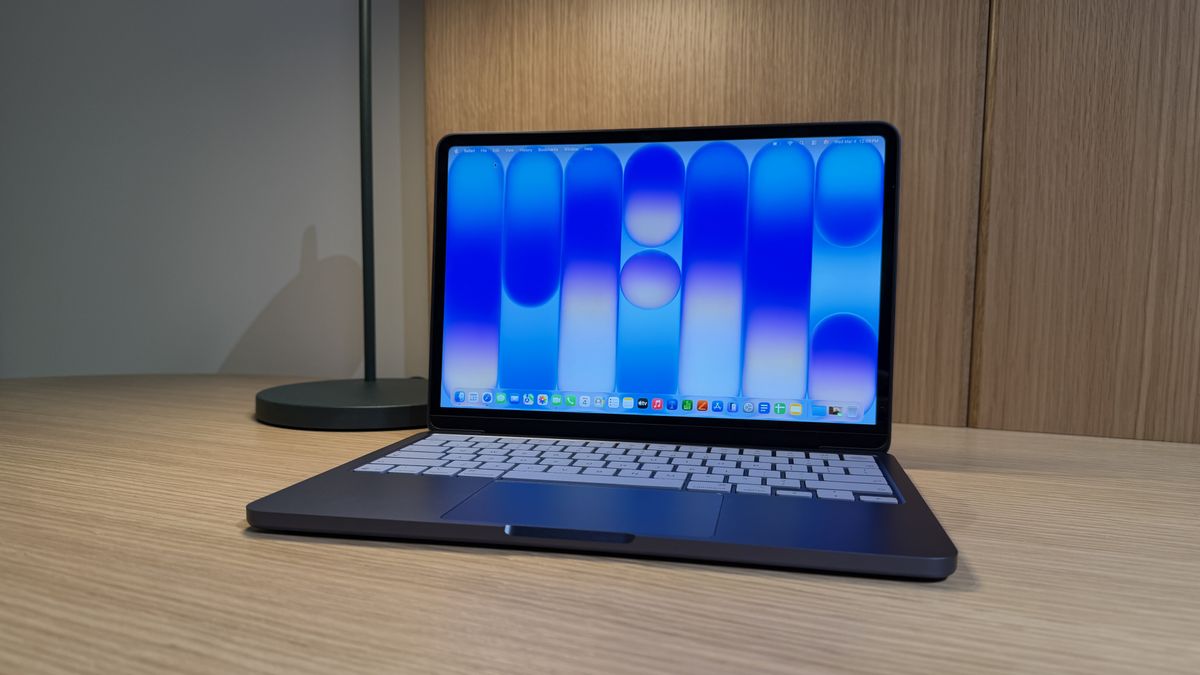
To start with, the MacBook Neo is an aesthetic delight. It’s extremely chic—almost posh. Weighing in at just 2.7 pounds, similar to the MacBook Air, it maintains a sleek profile. The aluminum finish feels smooth to the touch, while the rounded corners exude a modern appeal.


The color options—Citrus, Blush, Indigo, and Silver—are not just eye-catching; they are likely to dominate the scenes at hip cafés, campuses, and urban settings soon enough.
(Image credit: Jacob Krol/Future)
What really catches my attention are the color-matched keys. Apple is finally allowing for some personalization in our user experience, giving a touch of elegance that most $599 laptops—think Chromebooks and budget Windows PCs—simply do not offer.
The Power of the Apple Ecosystem
The Apple ecosystem is another significant advantage. Whether it’s an iPhone, AirPods, or even an iPad, these devices work seamlessly together. You could start a script or jot down an idea on your iPhone and instantly copy it over to the Mac to live in Google Docs, Pages, or an email draft.
Where I believe the MacBook Neo could shine for creators is through iPhone Mirroring. Many content creators, myself included, often edit videos directly on an iPhone using applications like CapCut and Edits. While those applications are powerful, sometimes a larger screen is desirable for comprehensive editing.
(Image credit: Jacob Krol/Future)
With iPhone Mirroring, I could access CapCut right on the Neo’s 13-inch Liquid Retina display, giving those mobile applications a significantly larger workspace. I’d still use familiar tools, but with the added benefits of a trackpad, keyboard, and an expansive laptop screen.
Since it runs on macOS, the workflow can extend even further. I could integrate assets from Photos, pull in graphics from Pixelmator Pro, or easily grab files directly from Finder to enhance any project.
A Perfect Hub for Creators
After finishing a project, the MacBook serves as the perfect place to wrap things up—downloading files, organizing assets, or even scheduling posts through TikTok Studio online. In this way, the MacBook Neo isn’t exactly replacing the iPhone as a creator’s tool—it’s extending its capabilities. While the iPhone may serve as the camera and editing device, the Neo becomes the central hub for creative workflows.
Photos, videos, messages, and notes seamlessly sync between devices. The MacBook Neo could naturally become the launchpad for creative concepts.
Moreover, if you’re a student, the value proposition becomes even more appealing. You can snag the MacBook Neo with the A18 Pro chip, 8GB of RAM, and 256GB of storage for $499 / AU$749 with Apple’s education discount ($599 / AU$899 otherwise). You could then subscribe to Creator Studio for $12.99 / AU$19.99 a month or $129 / AU$199 a year.

(Image credit: Apple)
This unlocks a plethora of applications—including Pixelmator Pro, Final Cut Pro, and Logic Pro—alongside AI-powered features in Pages, Keynote, and Numbers. While it’s not clear how well the Neo will handle heavier creative apps, Apple has made it obvious that the MacBook Neo is capable of leveraging macOS—utilizing Apple Intelligence today—designed for everyday use cases.
While it may not excel with flagship creative applications, I predict that iMovie, GarageBand, Pixelmator Pro, and iPhone Mirroring will perform admirably. My tests indicated that the Neo handled multiple tasks within Pixelmator Pro effortlessly.
So while it might not boast the highest-end features, it will still deliver the Mac experience—priced at $599—across most day-to-day applications. Additionally, you get a 1080p camera, an impressive 16 hours of battery life, a 1.5-meter USB-C to USB-C cable, 20-watt plug, and two side-firing speakers with Spatial Audio support, among other notable features.
Ultimately, the MacBook Neo is not merely the sum of its parts; it’s about how everything integrates—the ecosystem, the software, and a design that may be among the most stylish Macs Apple has released in years.
I am eager to test these workflows more thoroughly. However, considering the design, the competent A-series chip, and the capabilities of macOS, I have a hunch that the MacBook Neo might become the top choice for most users—even if it can’t fully keep pace with a MacBook Air or MacBook Pro when it comes to demanding applications like Final Cut Pro or the entire Adobe suite.
Follow TechRadar on Google News and add us as a preferred source to get our expert news, reviews, and opinions in your feeds. Don’t forget to click the Follow button!
You can also follow TechRadar on YouTube and TikTok for news, reviews, and unboxings in video format, and stay updated through WhatsApp as well.
Today’s Best Apple MacBook Neo Deals
For more insights, check out the full review here.
Image Credit: www.techradar.com


